Recurring buy didn't go through? Don't rebuild the plan yet: three Convert Recurring rules
A missed buy usually doesn't mean anything is broken. The execution minute of a Convert Recurring plan is fixed the moment you create it; a round your balance can't cover is simply skipped and the next one goes ahead as usual, and the plan is only cancelled after six straight months of failures. This goes through what to check, in order: version, minute, balance, pause, advanced settings.
The scheduled time has come and gone and there's no new coin in your account. Don't delete the plan and rebuild it just yet. A missed buy almost always comes down to one of three things: the execution minute hasn't arrived yet, this round was skipped because your balance couldn't cover it, or the plan has been paused or cancelled.
The one that scares people most is the one that deserves the least panic. Binance's help-centre FAQ on Convert “Recurring” says that when a purchase fails because the balance is too low, the system tries again on the next cycle, and the plan is only cancelled once execution has failed continuously for six months. Miss one round and the plan is still there. Rebuilding, on the other hand, does cost you something: the new plan's execution minute resets to the minute you rebuilt it, so the rhythm you lose is one you changed yourself. Let's go through it item by item.
First: check which version of recurring buy you're on
Binance moved recurring buy onto a different product in 2025. The old Auto-Invest plans became Convert Recurring, and the announcement was blunt about it: the original Auto-Invest service stopped after 31 March 2025, while the Index-Linked Plan keeps running. Existing Single Token and Portfolio plans were moved over to the Recurring feature on the Convert platform, and if you did nothing before the migration deadline, the system moved them for you.
The migration changed one thing that touches your money directly: “Previously, Auto-Invest included an additional fee on top of the quoted price provided by Binance. The new Convert Recurring feature will not have any additional fees; trades will be executed based on the quoted price from Binance Convert.” That line comes from Binance's Migration: Auto-Invest to Convert Recurring FAQ. The trade-off is that the pricing basis moved too. The help centre says it plainly: “Recurring prices may be different from market prices on Binance Spot.” The same page also warns: “The submission of a Specified Plan does not guarantee that Binance will accept such Specified Plan and/or any Scheduled Conversion.” So if you work backward from the spot chart and the price doesn't match the fill in your recurring history, that doesn't necessarily mean anything has gone wrong.
A note on an older piece on this site: Binance Auto-Invest: How to Set It Up (Step-by-Step) walks through the pre-migration Auto-Invest screens and the old pricing, so don't read its fee section as today's schedule — and don't go looking for that menu. New plans are created under Convert → Recurring. What still applies is the way it picks an amount and a frequency.
The execution minute is the minute you created the plan
This is the most common reason a buy seems to have gone missing, and the easiest one to spook yourself over. The official rule: “For 1/4/8/12 hourly plans, the initial trade occurs 1 hour after the plan creation time. For daily, weekly, bi-weekly and monthly plans, the initial execution time depends on the scheduled date and time.” And then: “The exact execution minute of the plan will be the same as the plan creation time's minute.”
Here are two of the examples from Binance's Convert Recurring FAQ, walked through one at a time. All times below are UTC+8, the timezone Binance uses in these examples — shift them to your own before you compare:
| Official example | Created | Plan setting | First execution | After that |
|---|---|---|---|---|
| Example 2 | 2025-03-14 14:17 | Daily · 8:00 | 03-15 8:17 | 03-16 8:17 |
| Example 4 | 2025-01-31 14:35 | Monthly · 31st, 17:00 | 01-31 17:35 | 02-28 17:35, 03-31 17:35 |
Example 2: created at 14:17, frequency daily, time set to 8:00. The first execution comes the next morning at 8:17. That day's 8:00 had already passed, and the “:17” on the end comes from the minute you hit confirm. Example 4: created at 14:35 on 31 January, monthly on the 31st at 17:00. The first execution lands the same day at 17:35, because 17:00 hadn't come round yet; the next one is 28 February at 17:35. The FAQ adds a separate note on this: “A ‘full month’ refers to the execution that will happen on the last day of the month, regardless if the month falls on the 29th, 30th or 31st.” Pick the 31st and the February round doesn't simply vanish.
There's something else that looks like a bug: the minutes shown under Plan Start Date and Next Trade Date in your plan details don't match the time you set under frequency. The help centre's explanation is that these minutes “indicate the approximate time at which the trade is executed and it follows the timing when users created the plan.” That's by design, so there's no need to screenshot it and send it to support. If you set an alarm for the top of the hour and sat there waiting, that wait is genuinely annoying, but it isn't a fault.
You can also turn this rule around: if you want the buy to land on a particular minute, create the plan at that minute. If you change the frequency, bear in mind that when the help centre explains execution times it's talking about creating a plan. How the timeline runs after you edit one isn't spelled out, so don't just assume the old rhythm and sit waiting for it.
Balance too low: that round is skipped, the plan stays
This one is worth reading word for word: “If your selected Wallet balance is insufficient to cover the Recurring plan purchase, the purchase will fail. The system will continue to try to make another purchase on the next Recurring cycle, if the execution fails continuously for a 6-month tenure, the recurring plan will be cancelled.”
In plain terms: a failed round isn't made up later; the next round is attempted as usual; and what actually kills the plan is six consecutive months without a success. Another answer in the same FAQ words it differently: “the Recurring plan will be ongoing until the plan has been cancelled by you, or when there is insufficient ‘From’ token assets in your wallet.” That's easy to read as “the plan ends the moment the balance runs short.” Go by the answer above: the plan is only cancelled after six straight months of failed executions. The “From” token here is the coin you pay with, not the one you're buying.
One thing to keep in mind: that page doesn't say whether you'll be notified when a round fails. So “I didn't get any notification” can't be taken as proof that the round went through. Check it against your recurring history.
Also, repeated failures usually aren't a system problem; they're a budget problem. Set the per-round amount so high that you have to watch your balance to get by, and sooner or later a round won't go through. I worked out how big that amount should be in How much should you put into crypto without losing your head? The idea is to set a ceiling on what you can afford to lose first, then divide backward.
Where to pause, cancel or edit a plan
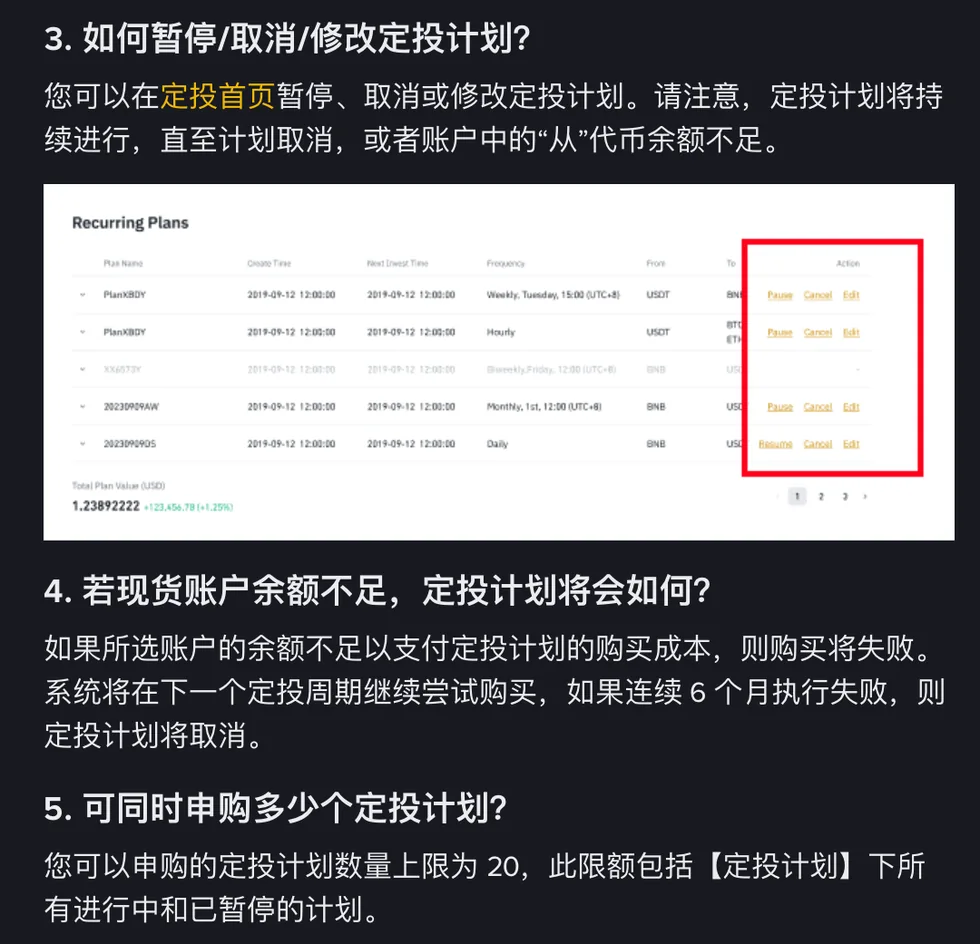
The help centre's answer is: “You can pause, cancel or edit the recurring plan on the homepage”, meaning the Recurring homepage. I'm not going to list the exact taps. The interface gets redesigned faster than articles get updated, so just head to the Recurring homepage and look there.
There's a limit that catches people out: “You can only subscribe to a maximum of 20 Recurring plans. This limit includes all ongoing and paused plans under [Recurring Plan].” Pausing a plan doesn't free up a slot. If you've got seven or eight paused “I'll deal with it later” plans lying around and one day you can't create a new one, that's most likely why. If you really don't want a plan, cancel it. Don't let pause double as a parking space for plans you've lost interest in.
There's also a timing window, mentioned on an older Binance page about managing plans: a plan can't be edited or stopped within 5 minutes before or after a trade is processed. That page still walks through the old interface, so the path it describes won't match what you see today, but the 5-minute limit is worth remembering. If you happen to be making changes right around execution time and nothing will budge, that's normal. Wait a few minutes and try again.
Set any advanced options? Check these two
Convert Recurring's advanced settings hold three things: Maximum Period, which caps the total number of purchases; Limit Price, which sets a price range for order execution; and a Recurring Plan Simulator for comparing strategies.
The first two are the setup choices people most often forget about when a buy goes missing. A cap on total purchases you set without much thought a few months ago may have just run out today; the price range you picked back then may sit exactly where today's quote isn't. On Limit Price, the official page only goes as far as “specify price ranges for order execution”. How a round outside that range gets recorded, and whether it counts as an execution, isn't explained there, so you'll need to check your recurring history yourself. That's why, when you troubleshoot, confirming whether you set these two at all is much faster than guessing whether the system is broken.
Buy didn't go through? Check in this order
- Version. Is your plan still sitting on the old Auto-Invest? The old service stopped after 31 March 2025, and what runs now is Recurring inside Convert. The Index-Linked Plan is the exception: it still runs on its own.
- Minute. Add the minute you created the plan to the scheduled time, then see whether that time has actually arrived.
- Balance. Is there enough of the coin you pay with to cover this round? A failed round doesn't void the plan straight away; only six straight months of failures do.
- Status. Has the plan been paused or cancelled? While you're at it, count your plans and see whether you're already up against the 20-plan cap.
- Advanced settings. Did you ever set Maximum Period or Limit Price?
Most of the time you'll have found the cause by step three. And if the balance check keeps failing, the problem usually isn't on Binance's side. It's the number you set for each round, which is more than you can reliably put aside right now. One of the most pointless ways for DCA to fail is getting stuck in year one on a budget you set too high yourself: the plan hasn't been cancelled, but you've already stopped wanting to look at it.
Frequently asked
When does Binance recurring buy execute?
Under the help centre's rules, 1/4/8/12-hourly plans execute for the first time 1 hour after creation; daily, weekly, bi-weekly and monthly plans execute on the date and time you schedule, and the exact minute matches the minute you created the plan. Official example: a daily plan set for 8:00 every day, created at 14:17 on 14 March 2025, first executes at 8:17 on 15 March.
What happens if my balance is too low for a Binance recurring buy? Will the plan be cancelled?
If the selected wallet's balance can't cover the purchase, that round fails and the system tries again on the next recurring cycle. The plan is only cancelled after execution has failed continuously for 6 months. In other words, one missed round doesn't end the plan.
Does pausing a recurring plan free up a slot?
No. You can subscribe to a maximum of 20 recurring plans, and that limit includes all ongoing and paused plans. Only cancelling a plan you don't intend to continue gives the slot back. Pausing, cancelling and editing are all done on the Recurring homepage.
Are there still fees on recurring buys after the move to Convert?
According to the migration FAQ, the old Auto-Invest charged an additional fee on top of the quoted price; the Recurring feature on Convert charges no additional fees, and trades execute at the Binance Convert quoted price. Worth noting: recurring prices may differ from market prices on Binance Spot.